|
Size: 1560
Comment:
|
Size: 3326
Comment:
|
| Deletions are marked like this. | Additions are marked like this. |
| Line 2: | Line 2: |
This functionality is only available in the development version of !FreeSurfer. Rather than directly contacting the author, please post your questions on this module to the !FreeSurfer [[FreeSurferSupport|mailing list]]. <<BR>> {{attachment:skullstrips.png||height="250"}} <<BR>> |
|
| Line 9: | Line 5: |
| '''''Robust, universal brain-extraction for images of any type.''''' {{attachment:skullstrips.png||width="600"}} SynthStrip is a skull-stripping tool that accurately extracts brain signal from a landscape of image types, ranging across imaging modality, contrast, resolution, and subject population. It leverages a deep-learning strategy that synthesizes arbitrary training images from segmentation maps to optimize a robust model agnostic to acquisition specifics. |
|
| Line 11: | Line 13: |
| We offer two ways of run !SynthStrip: within !FreeSurfer or as a standalone command-line tool. | The !SynthStrip command line tool can be be run within !FreeSurfer or as standalone utility using Docker or Singularity containers. |
| Line 13: | Line 15: |
| '''''Within !FreeSurfer:''''' As of March 1 2022, SynthStrip is available in the dev (nightly) !FreeSurfer distributions and will be included in the upcoming !FreeSurfer v7.3 release. | '''Within !FreeSurfer:''' As of March 14 2022, the `synthstrip` command is available in the dev (nightly) !FreeSurfer distributions and will be included in the upcoming !FreeSurfer v7.3 release. |
| Line 15: | Line 17: |
| '''''Standalone Utility:''''' If you do not want to install an entire !FreeSurfer distribution to run !SynthStrip, you can install a singular, pre-built macOS or linux !SynthStrip executable. To do this, download the maxOS or linux file from this source. | If you do not want to install an entire !FreeSurfer distribution, you can run !SynthStrip through a standalone script that wraps either a Docker or Singularity container. To download either of these scripts, run the commands described below. Once downloaded, please read the brief instructions in the header of the downloaded script. This is especially necessary for the Singularity script, which requires setting up a one-time configuration. The downloaded scripts can be run directly, using the same command-line syntax defined in the ''Usage'' section below. '''Singularity:''' To download the Singularity-based wrapper script, run: {{{ curl -O https://surfer.nmr.mgh.harvard.edu/ftp/dist/freesurfer/synthstrip/synthstrip-singularity && chmod +x synthstrip-singularity }}} '''Docker:''' To download the Docker-based wrapper script, run: {{{ curl -O https://surfer.nmr.mgh.harvard.edu/ftp/dist/freesurfer/synthstrip/synthstrip-docker && chmod +x synthstrip-docker }}} The aim of these wrappers is to provide easy mechanisms for running containers, i.e. so users do not need to worry about mounting paths to input and output files, etc. However, those who would like direct access to the standalone SynthStrip build image are welcome to access it from our [[https://hub.docker.com/r/freesurfer/synthstrip|DockerHub]] page. |
| Line 19: | Line 34: |
| Once installed, you can run !SynthStrip with the following: | Once installed, you can run !SynthStrip with the following command-line syntax: |
| Line 25: | Line 40: |
| In this command, `<input>` represents the path to the input image and `<stripped>` is the skull-stripped output. To also save the corresponding brain mask, the `-m` command line flag can be used to specify the mask output path. For additional options and command description, please use the `--help` flag. For the large majority of images with voxel sizes near 1 mm^3, !SynthStrip should run in less than 1 minute on the CPU. As image size (or resolution) increases, this runtime might increase as well. | '''Note:''' If using the Docker or Singularity wrappers, replace `synthstrip` with the downloaded script name, e.g. `synthstrip-singularity`. In this command, `<input>` represents the path to the input image and `<stripped>` is the skull-stripped output. To also save the corresponding brain mask, the `-m` command line flag can be used to specify the mask output path. For additional options and command description, please use the `--help` flag. For the large majority of images with voxel sizes near 1 mm^3^, !SynthStrip should run in less than 1 minute on the CPU. As image size (or resolution) increases, this runtime might increase as well. |
| Line 28: | Line 45: |
In the SynthStrip publication, we gather a large test set, from a collection of public datasets, that spans across acquisition type, age, and health. We plan to make this subset of images, along with ground-truth brain mask labels, available for download in the near future. |
SynthStrip
1. Overview
Robust, universal brain-extraction for images of any type.
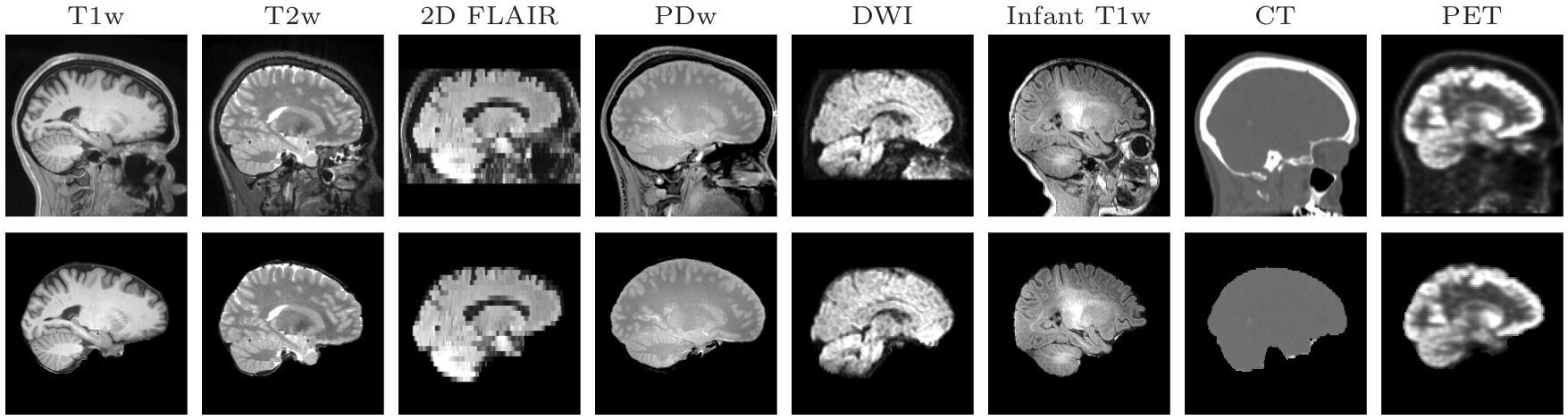
SynthStrip is a skull-stripping tool that accurately extracts brain signal from a landscape of image types, ranging across imaging modality, contrast, resolution, and subject population. It leverages a deep-learning strategy that synthesizes arbitrary training images from segmentation maps to optimize a robust model agnostic to acquisition specifics.
2. Installation
The SynthStrip command line tool can be be run within FreeSurfer or as standalone utility using Docker or Singularity containers.
Within FreeSurfer: As of March 14 2022, the synthstrip command is available in the dev (nightly) FreeSurfer distributions and will be included in the upcoming FreeSurfer v7.3 release.
If you do not want to install an entire FreeSurfer distribution, you can run SynthStrip through a standalone script that wraps either a Docker or Singularity container. To download either of these scripts, run the commands described below. Once downloaded, please read the brief instructions in the header of the downloaded script. This is especially necessary for the Singularity script, which requires setting up a one-time configuration. The downloaded scripts can be run directly, using the same command-line syntax defined in the Usage section below.
Singularity: To download the Singularity-based wrapper script, run:
curl -O https://surfer.nmr.mgh.harvard.edu/ftp/dist/freesurfer/synthstrip/synthstrip-singularity && chmod +x synthstrip-singularity
Docker: To download the Docker-based wrapper script, run:
curl -O https://surfer.nmr.mgh.harvard.edu/ftp/dist/freesurfer/synthstrip/synthstrip-docker && chmod +x synthstrip-docker
The aim of these wrappers is to provide easy mechanisms for running containers, i.e. so users do not need to worry about mounting paths to input and output files, etc. However, those who would like direct access to the standalone SynthStrip build image are welcome to access it from our DockerHub page.
3. Usage
Once installed, you can run SynthStrip with the following command-line syntax:
synthstrip -i <input> -o <stripped>
Note: If using the Docker or Singularity wrappers, replace synthstrip with the downloaded script name, e.g. synthstrip-singularity.
In this command, <input> represents the path to the input image and <stripped> is the skull-stripped output. To also save the corresponding brain mask, the -m command line flag can be used to specify the mask output path. For additional options and command description, please use the --help flag. For the large majority of images with voxel sizes near 1 mm3, SynthStrip should run in less than 1 minute on the CPU. As image size (or resolution) increases, this runtime might increase as well.
4. Evaluation Dataset
In the SynthStrip publication, we gather a large test set, from a collection of public datasets, that spans across acquisition type, age, and health. We plan to make this subset of images, along with ground-truth brain mask labels, available for download in the near future.