
|
Size: 3541
Comment:
|
Size: 6996
Comment:
|
| Deletions are marked like this. | Additions are marked like this. |
| Line 1: | Line 1: |
| === work in progress... === == About == Walkthrough: How to use FsFast and [[http://surfer.nmr.mgh.harvard.edu/fswiki/fcseed-sess|fcseed-sess]] for functional connectivity analysis including example commands. |
|
| Line 5: | Line 2: |
| For general tips on using FsFast, download this powerpoint: | This page describes how to perform seed-based functional connectivity (FC) analysis in FSFAST. The FC analysis is an extension of the task-based analysis for which there is much more documentation. These instructions mainly cover the details specific to FC analysis. The other steps are given minimal treatment under the understanding that many more details can be found in the task based analysis documentation as found in [[http://surfer.nmr.mgh.harvard.edu/pub/docs/freesurfer.fsfast.ppt|FS-FAST powerpoint]] and the [[http://surfer.nmr.mgh.harvard.edu/fswiki/FsFastTutorial|FS-FAST tutorial]]. Steps 4, 5, and 6 are the only ones specific to FC analysis. |
| Line 7: | Line 5: |
| . [[http://surfer.nmr.mgh.harvard.edu/pub/docs/freesurfer.fsfast.ppt|Using FS-FAST]] | *STEP 1: Unpack Data into the FSFAST Hierarchy using dcmunpack (run with -help for more documentation): |
| Line 9: | Line 7: |
| *STEP 1: Unpack Data into the FSFAST Hierarchy using "unpackscmdir" | Sample cmd: |
| Line 11: | Line 9: |
| [[https://surfer.nmr.mgh.harvard.edu/fswiki/unpacksdcmdir|unpacksdcmdir]] | dcmunpack -src dicomdir -targ sessionid -fsfast -run 3 bold nii.gz f.nii.gz -run 4 bold nii.gz f.nii.gz |
| Line 13: | Line 11: |
| 1.QA Check after unpacking: | In this sample command... |
| Line 15: | Line 13: |
| * A - Check unpacked data (time points, # of slices ..etc) * B - Check FSFAST hierarchy in session folder *STEP 2: Reconstruction Anatomical data using "recon-al -all" 1.Set SUBJECTS_DIR 2.QA Check: * A - Check talairach transformation * B - Check skull strip, white matter & pial surface * C - Re-run "recon-all" if edits are made * D - Check hierarchy of reconstructed anatomical data [[https://surfer.nmr.mgh.harvard.edu/fswiki/recon-all|recon-all]] 1.Make FSFAST basic hierarchy (only if data are not unpacked in FSFAST hierarchy) |
* Have all fMRI dicoms for this subject in the dicomdir folder or subfolders under this folder * Arguement for "-targ" specifies output directory here called "sessionid". This should be unique to the subject (and visit if longitudinal). This is called the session folder. * -run 3 bold nii.gz f.nii.gz will unpack run 3 fmri to sessionid/bold/003/f.nii.gz * To get a list of runs, run dcmunpack -src dicomdir/subject/ALLDICOMS * Use "-fsfast" to generate fsfast hierarchy shown in the image below * The parent folder of the sessionid folder is called the "Project Folder" or "Project Directory". All the commands below should be run from the Project Folder. |
| Line 33: | Line 22: |
| 2.Link to FreeSurfer anatomical analysis A - Make subjectname file in the session directory to link a subject's functional & structural data 3.Create a sessid file (text file with list of your sessions)in your Study DIR. 4.Create a Stimulus Schedule (Paradigm file) in bold folder (A "paradigm" file is a record of which stimulus was presented when & for how long. Each paradigm file has four columns: * A - Stimulus onset time (sec) * B - Condition ID code (0, 1, 2, ...) * C - Stimulus Duration (sec) * D - Stimulus Weight (usually 1) |
*STEP 2: Link to FreeSurfer anatomical analysis. This is done by creating a text file called sessionid/subjectname with the name of the FreeSurfer anatomical folder as created with recon-all and found in $SUBJECTS_DIR. |
| Line 50: | Line 26: |
| # Preprocessing of fMRI Data | Sample cmd: |
| Line 52: | Line 28: |
| preproc-sess -s <subjid> -fwhm <#> | preproc-sess -s sessionid -fwhm 5 -surface fsaverage lhrh -mni305-2mm |
| Line 54: | Line 30: |
| 1.By default this will do motion correction, smoothing & brain masking | By default this will do motion correction, masking, registration to the anatomical, sampling to the surface, and surface smoothing by 5mm as well as sampling to the mni305 with volume smoothing. The surface sampling is done onto the surface of the lh and rh hemispheres of fsaverage. The mni305 is only used for volume-based analysis of subcortical structures. Note that eventhough the time series data are sampled onto fsaverage, the FC seeds are derived from the indvidual anatomy as shown below using unsmoothed data. See the task-based analysis documentation for more information. |
| Line 56: | Line 32: |
| 2.Quality Check (plot-twf-sess) 3.Examine additions to FSFAST hierarchy (in each run of bold dir): | |
| Line 58: | Line 33: |
| . f.nii (Raw fMRI data) . fmc.nii (Motion corrected-MC) fmcsm5.nii (MC & smoothed) . fmc.mcdat (Text file with the MC parameters (AFNI)) . brain.mgz (Binary mask of the brain) |
*STEP 4: Use fcseed-config to configure the parameters you wish to pass to your connectivity analysis. |
| Line 64: | Line 35: |
| # Function-Structure Registration View unregistered: | Sample command: {{{fcseed-config -segid 1010 -fcname L_Posteriorcingulate.dat -fsd bold -mean -cfg mean.L_Posteriorcingulate.config}}} |
| Line 66: | Line 38: |
| . [[http://surfer.nmr.mgh.harvard.edu/fswiki/tkregister-sess|tkregister-sess]] -s <subjid> -regheader) | This example will use the FreeSurfer cortical segmentation for the left posterior cingulate (segID: 1010, see $FREESURFER_HOME/FreeSurferColorLUT.txt for more) as defined for this individual in aparc+aseg.mgz. For seed regions, we recommend generating the mean signal timecourse by using "-mean". Note that this does not perform any analysis, it just creates a text file with the configuration. You can include more -segid flags to include more regions (though it will create only one seed time course). NOTE: Once a config file is created it may be used for multiple sessions. |
| Line 68: | Line 40: |
| Run automatic registration: | If you want to split a Freesurfer parcellation into multiple seeds ("split parcellation"), follow the [[FsFastFunctionalConnectivityWalkthroughSplittingSeeds |additional steps here]] - and resume with step 4 on this page... |
| Line 70: | Line 42: |
| . [[http://surfer.nmr.mgh.harvard.edu/fswiki/spmregister-sess|spmregister-sess]] -s <subjid> | *STEP 5: Create the FC seed for an individual |
| Line 72: | Line 44: |
| Check automatic registration: | {{{fcseed-sess -s sessionid -cfg L_Posteriorcingulate.config}}} |
| Line 74: | Line 46: |
| . [[http://surfer.nmr.mgh.harvard.edu/fswiki/tkregister-sess|tkregister-sess]] -s <subjid> | This creates a file called L_Posteriorcingulate.dat in each resting state run. This will have a single time course in it |
| Line 76: | Line 48: |
| A - Make edits if needed using scale as the last resort Check talairach registration: | *STEP 6: Create nuisance variables |
| Line 78: | Line 50: |
| . [[http://surfer.nmr.mgh.harvard.edu/fswiki/tkregister2|tkregister2]] --s <subjid> --fstal --surf | for white matter: . fcseed-config -wm -fcname wm.dat -fsd bold -pca -cfg wm.config . fcseed-sess -s sessionid -cfg wm.config |
| Line 80: | Line 54: |
| *STEP 4: Use fcseed-sess to generate time-course information for your chosen seed region (as well as nuisance variable signal). | for ventricles + CSF: . fcseed-config -vcsf -fcname vcsf.dat -fsd bold -pca -cfg vcsf.config . fcseed-sess -s sessionid -cfg vcsf.config |
| Line 82: | Line 58: |
| *STEP 5: Use [[http://surfer.nmr.mgh.harvard.edu/fswiki/mkanalysis-sess|mkanalysis-sess]] to setup an analysis for your FC data | These commands will create wm.dat and vcsf.dat in for each resting state run. These are text files with multiple columns. Each column is a principle component. You will choose the number of components to use below. |
| Line 84: | Line 61: |
| *STEP 6: Use [[http://surfer.nmr.mgh.harvard.edu/fswiki/selxavg3-sess|selxavg3-sess]] to run the subject-level analysis | *STEP 7: Use [[http://surfer.nmr.mgh.harvard.edu/fswiki/mkanalysis-sess|mkanalysis-sess]] to configure an analysis for your FC data. Like the fcseed-config above, this is done once regardless of how many sessionds you have. |
| Line 86: | Line 63: |
| *STEP 7: Use [[http://surfer.nmr.mgh.harvard.edu/fswiki/mri_glmfit|mri_glmfit]] or [[http://surfer.nmr.mgh.harvard.edu/fswiki/selxavg3-sess|selxavg3-sess]] to run a group-level analysis | {{{mkanalysis-sess -analysis fc.lpccseed.surf.lh -surface fsaverage lh -fwhm 5 -notask -taskreg L_Posteriorcingulate.dat 1 -nuisreg vcsf.dat 5 -nuisreg wm.dat 5 -mcreg -polyfit 5 -nskip 4 -fsd bold -TR <TR> }}} This command does not perform any analysis; it just creates an analysis configuration called "fc.lpccseed.surf.lh". There will be a folder of this name with a text file called analysis.info. The analysis will be run on the left hemisphere of fsaverage smoothed by 5 mm (this was already performed in preprocessing above). The waveform in the file called mean.L_Posteriorcingulate.dat will be used as the "task regressor"; this is just the FC seed. There are five sets of nuisance variables: (1) the CSF from which the top 5 principle components will be used, (2) the white matter from which the top 5 principle components will be used, (3) motion correction parameters (-mcreg), (4) 5th order polynomial, and (5) the first 4 time points will be discarded. If you with to perform global signal regression, add "-nuisreg global.waveform.dat 1". Specify the TR with the -TR flag (eg, TR 2 for 2 seconds). Note that separate mkanalysis-sess commands will need to be run for the righ hemisphere and for the mni305 volume-based analysis. *STEP 8: Use [[http://surfer.nmr.mgh.harvard.edu/fswiki/selxavg3-sess|selxavg3-sess]] to run the subject-level analysis outlined by the above mkanalysis-sess cmd just as you would with a task-based analysis {{{selxavg3-sess -s sessionid -a fc.lpccseed.surf.lh}}} This performs the voxel-wise time series analysis for the given session. This results in several files being generated in the session folder. These include * ces.mgz - contrast effect size (contrast matrix * regression coef) * cesvar.mgz - variance of contrast effect size * sig.mgz - significance map (-log10(p)) * pcc.mgz - partial correlation coefficient map *STEP 9: Group-level analysiss As with task-based analysis, you will run isxconcat-sess to create a "stack" of maps from each subject. If you want to use the correlation coefficient instead of the ces, specify -map pcc. Specify the contrast as L_Posteriorcingulate (or just use -all-contrasts). After that, you can perform the standard group FS group analysis. |
This page describes how to perform seed-based functional connectivity (FC) analysis in FSFAST. The FC analysis is an extension of the task-based analysis for which there is much more documentation. These instructions mainly cover the details specific to FC analysis. The other steps are given minimal treatment under the understanding that many more details can be found in the task based analysis documentation as found in FS-FAST powerpoint and the FS-FAST tutorial. Steps 4, 5, and 6 are the only ones specific to FC analysis.
*STEP 1: Unpack Data into the FSFAST Hierarchy using dcmunpack (run with -help for more documentation):
Sample cmd:
dcmunpack -src dicomdir -targ sessionid -fsfast -run 3 bold nii.gz f.nii.gz -run 4 bold nii.gz f.nii.gz
In this sample command...
- Have all fMRI dicoms for this subject in the dicomdir folder or subfolders under this folder
- Arguement for "-targ" specifies output directory here called "sessionid". This should be unique to the subject (and visit if longitudinal). This is called the session folder.
- -run 3 bold nii.gz f.nii.gz will unpack run 3 fmri to sessionid/bold/003/f.nii.gz
- To get a list of runs, run dcmunpack -src dicomdir/subject/ALLDICOMS
- Use "-fsfast" to generate fsfast hierarchy shown in the image below
- The parent folder of the sessionid folder is called the "Project Folder" or "Project Directory". All the commands below should be run from the Project Folder.
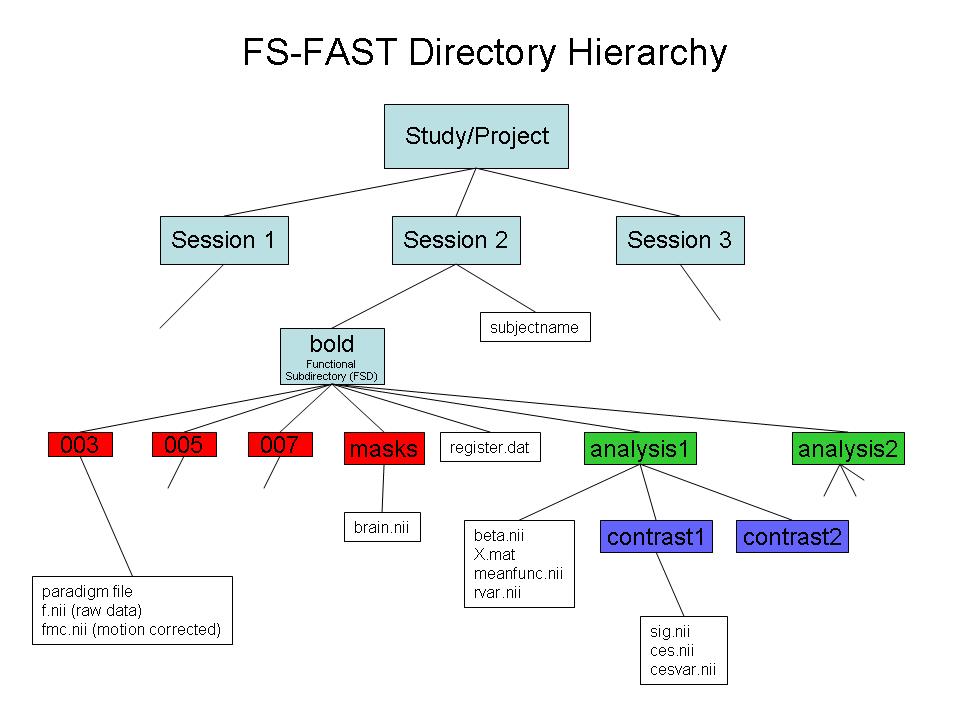
*STEP 2: Link to FreeSurfer anatomical analysis. This is done by creating a text file called sessionid/subjectname with the name of the FreeSurfer anatomical folder as created with recon-all and found in $SUBJECTS_DIR.
*STEP 3: Pre-process your bold data using preproc-sess preproc-sess
Sample cmd:
preproc-sess -s sessionid -fwhm 5 -surface fsaverage lhrh -mni305-2mm
By default this will do motion correction, masking, registration to the anatomical, sampling to the surface, and surface smoothing by 5mm as well as sampling to the mni305 with volume smoothing. The surface sampling is done onto the surface of the lh and rh hemispheres of fsaverage. The mni305 is only used for volume-based analysis of subcortical structures. Note that eventhough the time series data are sampled onto fsaverage, the FC seeds are derived from the indvidual anatomy as shown below using unsmoothed data. See the task-based analysis documentation for more information.
*STEP 4: Use fcseed-config to configure the parameters you wish to pass to your connectivity analysis.
Sample command: fcseed-config -segid 1010 -fcname L_Posteriorcingulate.dat -fsd bold -mean -cfg mean.L_Posteriorcingulate.config
This example will use the FreeSurfer cortical segmentation for the left posterior cingulate (segID: 1010, see $FREESURFER_HOME/FreeSurferColorLUT.txt for more) as defined for this individual in aparc+aseg.mgz. For seed regions, we recommend generating the mean signal timecourse by using "-mean". Note that this does not perform any analysis, it just creates a text file with the configuration. You can include more -segid flags to include more regions (though it will create only one seed time course). NOTE: Once a config file is created it may be used for multiple sessions.
If you want to split a Freesurfer parcellation into multiple seeds ("split parcellation"), follow the additional steps here - and resume with step 4 on this page...
*STEP 5: Create the FC seed for an individual
fcseed-sess -s sessionid -cfg L_Posteriorcingulate.config
This creates a file called L_Posteriorcingulate.dat in each resting state run. This will have a single time course in it
*STEP 6: Create nuisance variables
for white matter:
- fcseed-config -wm -fcname wm.dat -fsd bold -pca -cfg wm.config
- fcseed-sess -s sessionid -cfg wm.config
for ventricles + CSF:
- fcseed-config -vcsf -fcname vcsf.dat -fsd bold -pca -cfg vcsf.config
- fcseed-sess -s sessionid -cfg vcsf.config
These commands will create wm.dat and vcsf.dat in for each resting state run. These are text files with multiple columns. Each column is a principle component. You will choose the number of components to use below.
*STEP 7: Use mkanalysis-sess to configure an analysis for your FC data. Like the fcseed-config above, this is done once regardless of how many sessionds you have.
mkanalysis-sess -analysis fc.lpccseed.surf.lh -surface fsaverage lh -fwhm 5 -notask -taskreg L_Posteriorcingulate.dat 1 -nuisreg vcsf.dat 5 -nuisreg wm.dat 5 -mcreg -polyfit 5 -nskip 4 -fsd bold -TR <TR>
This command does not perform any analysis; it just creates an analysis configuration called "fc.lpccseed.surf.lh". There will be a folder of this name with a text file called analysis.info. The analysis will be run on the left hemisphere of fsaverage smoothed by 5 mm (this was already performed in preprocessing above). The waveform in the file called mean.L_Posteriorcingulate.dat will be used as the "task regressor"; this is just the FC seed. There are five sets of nuisance variables: (1) the CSF from which the top 5 principle components will be used, (2) the white matter from which the top 5 principle components will be used, (3) motion correction parameters (-mcreg), (4) 5th order polynomial, and (5) the first 4 time points will be discarded. If you with to perform global signal regression, add "-nuisreg global.waveform.dat 1". Specify the TR with the -TR flag (eg, TR 2 for 2 seconds). Note that separate mkanalysis-sess commands will need to be run for the righ hemisphere and for the mni305 volume-based analysis.
*STEP 8: Use selxavg3-sess to run the subject-level analysis outlined by the above mkanalysis-sess cmd just as you would with a task-based analysis
selxavg3-sess -s sessionid -a fc.lpccseed.surf.lh
This performs the voxel-wise time series analysis for the given session. This results in several files being generated in the session folder. These include
- ces.mgz - contrast effect size (contrast matrix * regression coef)
- cesvar.mgz - variance of contrast effect size
- sig.mgz - significance map (-log10(p))
- pcc.mgz - partial correlation coefficient map
*STEP 9: Group-level analysiss
As with task-based analysis, you will run isxconcat-sess to create a "stack" of maps from each subject. If you want to use the correlation coefficient instead of the ces, specify -map pcc. Specify the contrast as L_Posteriorcingulate (or just use -all-contrasts). After that, you can perform the standard group FS group analysis.