
|
Size: 56
Comment:
|
Size: 4536
Comment:
|
| Deletions are marked like this. | Additions are marked like this. |
| Line 1: | Line 1: |
| Describe FsFastFunctionalConnectivityWalkthrough here. | === work in progress... === == About == Walkthrough: How to use FsFast and [[http://surfer.nmr.mgh.harvard.edu/fswiki/fcseed-sess|fcseed-sess]] for functional connectivity analysis including example commands. For general tips on using FsFast, download this [[http://surfer.nmr.mgh.harvard.edu/pub/docs/freesurfer.fsfast.ppt|FS-FAST powerpoint]] This walkthrough demonstrates how to run a functional connectivity analysis on resting state fMRI data. *STEP 1: Unpack Data into the FSFAST Hierarchy using [[https://surfer.nmr.mgh.harvard.edu/fswiki/unpacksdcmdir|unpacksdcmdir]] Ex: unpacksdcmdir -src dicomdir/subject/ALLDICOMS -targ fcMRI_dir/subject -cfg subject_config.txt -fsfast -unpackerr In this example command... *Have all fMRI dicoms linked into "ALLDICOMS" directory *Arguement for "-targ" specifies output directory *subject_config.txt is a configuration text file you create (format below) *Use "-fsfast" to generate fsfast hierarchy subject_config.txt format: 28 bold nii f.nii 29 bold nii f.nii Col.1: scan acquisition number Col.2: output dir name will be created within "fcMRI_dir/subject" Col.3: output file format - this example is nifti format Col.4: output filename. In this example, 2 files will be created: fcMRI_dir/subject/028/f.nii fcMRI_dir/subject/029/f.nii 1.QA Check after unpacking: * A - Check unpacked data (time points, # of slices ..etc) * B - Check FSFAST hierarchy in session folder *STEP 2: Reconstruction Anatomical data using [[https://surfer.nmr.mgh.harvard.edu/fswiki/recon-all| recon-all]] Ex: setenv SUBJECTS_DIR /path/to/recon_dir/ recon-all -s subject_dirname -all -i pathtoT1dicom_scan1.dcm -i pathtoT1dicom_scan2.dcm In this example command... *set your SUBJECTS_DIR variable to your FreeSurfer subject recon directory *set the subject's directory name with "-s" ... the arguement you provide will become the directory name within $SUBJECTS_DIR *use "-i" to supply the dicoms to reconstruct. Use one "-i" per T1 acquisition. 2.QA Check: * A - Check talairach transformation * B - Check skull strip, white matter & pial surface * C - Re-run "recon-all" if edits are made * D - Check hierarchy of reconstructed anatomical data 1.Double-check for FSFAST basic hierarchy {{attachment:fsfast-hierarchy.jpg}} 2.Link to FreeSurfer anatomical analysis: A - Create "subjectname" text file in the session directory. Write in it the subject's recon directory name (found within $SUBJECTS_DIR). 3.Create a sessid file (text file with list of your sessions)in your Study DIR. *STEP 3: Pre-process your bold data using preproc-sess [[http://surfer.nmr.mgh.harvard.edu/fswiki/preproc-sess|preproc-sess]] preproc-sess -s <subjid> -fwhm <#> 1.By default this will do motion correction, smoothing & brain masking 2.Quality Check (plot-twf-sess) 3.Examine additions to FSFAST hierarchy (in each run of bold dir): ||f.nii || (Raw fMRI data) || ||fmc.nii || (Motion corrected-MC)|| ||fmcsm5.nii|| (MC & smoothed)|| ||fmc.mcdat|| (Text file with the MC parameters (AFNI))|| ||brain.mgz ||(Binary mask of the brain)|| # Function-Structure Registration View unregistered: . [[http://surfer.nmr.mgh.harvard.edu/fswiki/tkregister-sess|tkregister-sess]] -s <subjid> -regheader) Run automatic registration: . [[http://surfer.nmr.mgh.harvard.edu/fswiki/spmregister-sess|spmregister-sess]] -s <subjid> Check automatic registration: . [[http://surfer.nmr.mgh.harvard.edu/fswiki/tkregister-sess|tkregister-sess]] -s <subjid> A - Make edits if needed using scale as the last resort Check talairach registration: . [[http://surfer.nmr.mgh.harvard.edu/fswiki/tkregister2|tkregister2]] --s <subjid> --fstal --surf *STEP 4: Use fcseed-sess to generate time-course information for your chosen seed region (as well as nuisance variable signal). *STEP 5: Use [[http://surfer.nmr.mgh.harvard.edu/fswiki/mkanalysis-sess|mkanalysis-sess]] to setup an analysis for your FC data *STEP 6: Use [[http://surfer.nmr.mgh.harvard.edu/fswiki/selxavg3-sess|selxavg3-sess]] to run the subject-level analysis *STEP 7: Use [[http://surfer.nmr.mgh.harvard.edu/fswiki/mri_glmfit|mri_glmfit]] or [[http://surfer.nmr.mgh.harvard.edu/fswiki/selxavg3-sess|selxavg3-sess]] to run a group-level analysis |
work in progress...
About
Walkthrough: How to use FsFast and fcseed-sess for functional connectivity analysis including example commands.
For general tips on using FsFast, download this FS-FAST powerpoint
This walkthrough demonstrates how to run a functional connectivity analysis on resting state fMRI data.
*STEP 1: Unpack Data into the FSFAST Hierarchy using unpacksdcmdir
Ex: unpacksdcmdir -src dicomdir/subject/ALLDICOMS -targ fcMRI_dir/subject -cfg subject_config.txt -fsfast -unpackerr
In this example command...
- Have all fMRI dicoms linked into "ALLDICOMS" directory
- Arguement for "-targ" specifies output directory
- subject_config.txt is a configuration text file you create (format below)
- Use "-fsfast" to generate fsfast hierarchy
subject_config.txt format:
28 bold nii f.nii 29 bold nii f.nii
Col.1: scan acquisition number Col.2: output dir name will be created within "fcMRI_dir/subject" Col.3: output file format - this example is nifti format Col.4: output filename. In this example, 2 files will be created:
- fcMRI_dir/subject/028/f.nii fcMRI_dir/subject/029/f.nii
1.QA Check after unpacking:
- A - Check unpacked data (time points, # of slices ..etc)
- B - Check FSFAST hierarchy in session folder
*STEP 2: Reconstruction Anatomical data using recon-all
Ex:
setenv SUBJECTS_DIR /path/to/recon_dir/ recon-all -s subject_dirname -all -i pathtoT1dicom_scan1.dcm -i pathtoT1dicom_scan2.dcm
In this example command...
set your SUBJECTS_DIR variable to your FreeSurfer subject recon directory
- set the subject's directory name with "-s" ... the arguement you provide will become the directory name within $SUBJECTS_DIR
- use "-i" to supply the dicoms to reconstruct. Use one "-i" per T1 acquisition.
2.QA Check:
- A - Check talairach transformation
B - Check skull strip, white matter & pial surface
- C - Re-run "recon-all" if edits are made
- D - Check hierarchy of reconstructed anatomical data
1.Double-check for FSFAST basic hierarchy
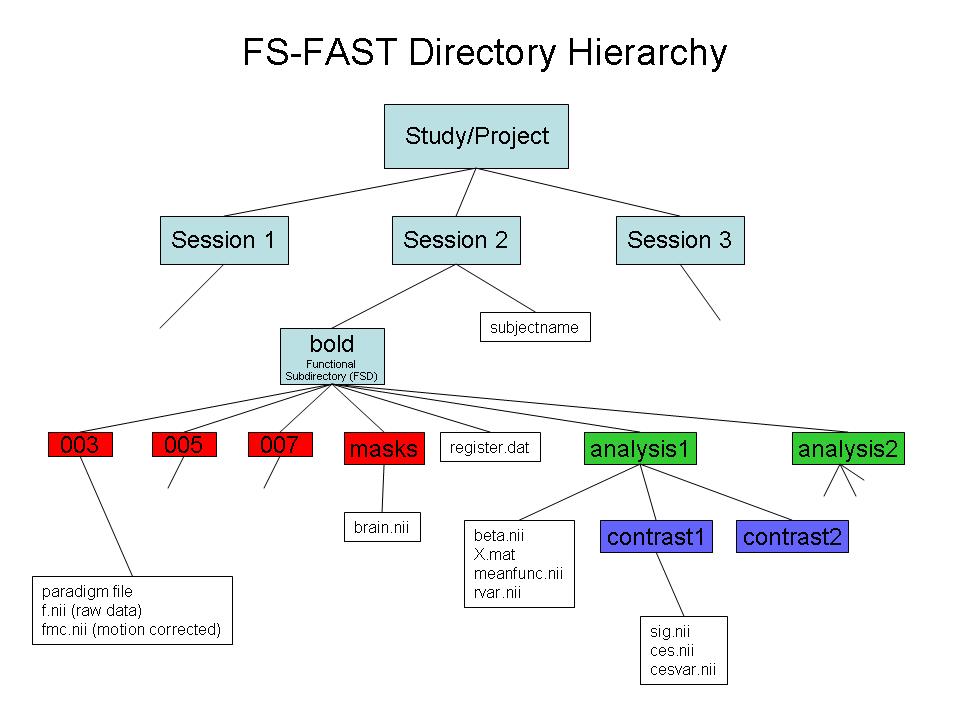
2.Link to FreeSurfer anatomical analysis:
A - Create "subjectname" text file in the session directory. Write in it the subject's recon directory name (found within $SUBJECTS_DIR).
3.Create a sessid file (text file with list of your sessions)in your Study DIR.
*STEP 3: Pre-process your bold data using preproc-sess preproc-sess
preproc-sess -s <subjid> -fwhm <#>
1.By default this will do motion correction, smoothing & brain masking
2.Quality Check (plot-twf-sess) 3.Examine additions to FSFAST hierarchy (in each run of bold dir):
f.nii
(Raw fMRI data)
fmc.nii
(Motion corrected-MC)
fmcsm5.nii
(MC & smoothed)
fmc.mcdat
(Text file with the MC parameters (AFNI))
brain.mgz
(Binary mask of the brain)
# Function-Structure Registration View unregistered:
tkregister-sess -s <subjid> -regheader)
Run automatic registration:
spmregister-sess -s <subjid>
Check automatic registration:
tkregister-sess -s <subjid>
A - Make edits if needed using scale as the last resort Check talairach registration:
tkregister2 --s <subjid> --fstal --surf
*STEP 4: Use fcseed-sess to generate time-course information for your chosen seed region (as well as nuisance variable signal).
*STEP 5: Use mkanalysis-sess to setup an analysis for your FC data
*STEP 6: Use selxavg3-sess to run the subject-level analysis
*STEP 7: Use mri_glmfit or selxavg3-sess to run a group-level analysis